Video Text
An explanation of how the VideoText component works: using SVGs as dynamic CSS masks to play video inside display typography.
Technical breakdown of the VideoText component: using SVGs as dynamic, responsive CSS masks to play background videos inside the boundaries of display text.
[!NOTE] Source: Magic UI Video Text

1. High-Level Flow Chart
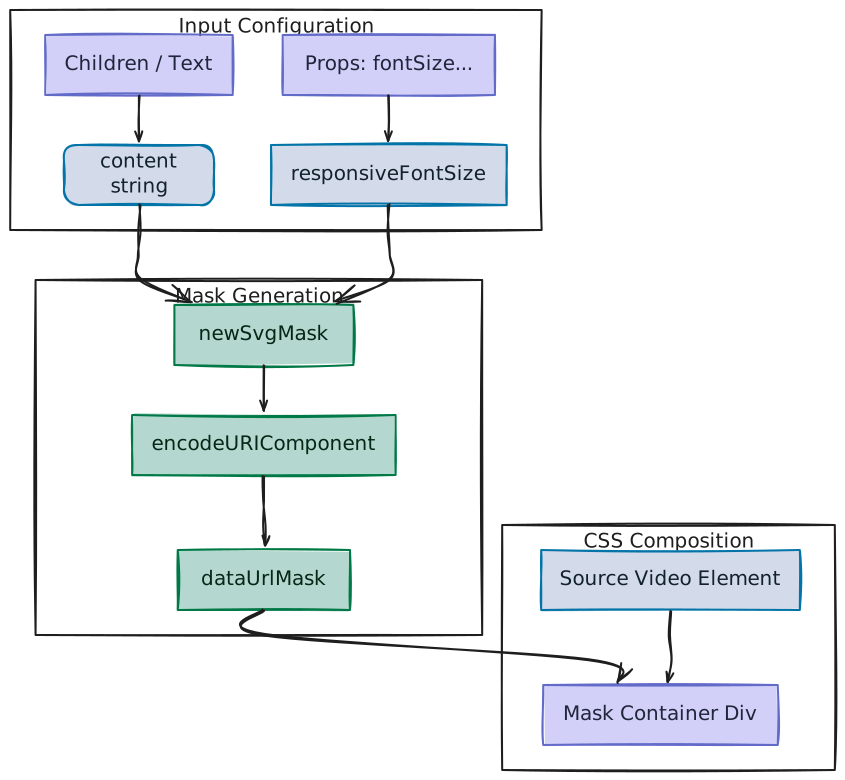
The diagram below outlines the structural pipeline of the VideoText component. It charts the journey of the text string from React state through inline SVG rasterization, data-URI encoding, and dynamic mask application, down to the final rendering of the video element:
2. Component Implementation (video-text.tsx)
Below is the complete implementation of the VideoText component:
"use client"

import React, {
  useEffect,
  useState,
  type ElementType,
  type ReactNode,
} from "react"

import { cn } from "@/lib/utils"

export interface VideoTextProps {
  /**
   * The video source URL
   */
  src: string
  /**
   * Additional className for the container
   */
  className?: string
  /**
   * Whether to autoplay the video
   */
  autoPlay?: boolean
  /**
   * Whether to mute the video
   */
  muted?: boolean
  /**
   * Whether to loop the video
   */
  loop?: boolean
  /**
   * Whether to preload the video
   */
  preload?: "auto" | "metadata" | "none"
  /**
   * The content to display (will have the video "inside" it)
   */
  children: ReactNode
  /**
   * Font size for the text mask (in viewport width units)
   * @default 10
   */
  fontSize?: string | number
  /**
   * Font weight for the text mask
   * @default "bold"
   */
  fontWeight?: string | number
  /**
   * Text anchor for the text mask
   * @default "middle"
   */
  textAnchor?: string
  /**
   * Dominant baseline for the text mask
   * @default "middle"
   */
  dominantBaseline?: string
  /**
   * Font family for the text mask
   * @default "sans-serif"
   */
  fontFamily?: string
  /**
   * The element type to render for the text
   * @default "div"
   */
  as?: ElementType
}

export function VideoText({
  src,
  children,
  className = "",
  autoPlay = true,
  muted = true,
  loop = true,
  preload = "auto",
  fontSize = 20,
  fontWeight = "bold",
  textAnchor = "middle",
  dominantBaseline = "middle",
  fontFamily = "sans-serif",
  as: Component = "div",
}: VideoTextProps) {
  const [svgMask, setSvgMask] = useState("")
  const content = React.Children.toArray(children).join("")

  useEffect(() => {
    const updateSvgMask = () => {
      const responsiveFontSize =
        typeof fontSize === "number" ? `${fontSize}vw` : fontSize
      const newSvgMask = `<svg xmlns='http://www.w3.org/2000/svg' width='100%' height='100%'><text x='50%' y='50%' font-size='${responsiveFontSize}' font-weight='${fontWeight}' text-anchor='${textAnchor}' dominant-baseline='${dominantBaseline}' font-family='${fontFamily}'>${content}</text></svg>`
      setSvgMask(newSvgMask)
    }

    updateSvgMask()
    window.addEventListener("resize", updateSvgMask)
    return () => window.removeEventListener("resize", updateSvgMask)
  }, [content, fontSize, fontWeight, textAnchor, dominantBaseline, fontFamily])

  const dataUrlMask = `url("data:image/svg+xml,${encodeURIComponent(svgMask)}")`

  return (
    <Component className={cn(`relative size-full`, className)}>
      {/* Create a container that masks the video to only show within text */}
      <div
        className="absolute inset-0 flex items-center justify-center"
        style={{
          maskImage: dataUrlMask,
          WebkitMaskImage: dataUrlMask,
          maskSize: "contain",
          WebkitMaskSize: "contain",
          maskRepeat: "no-repeat",
          WebkitMaskRepeat: "no-repeat",
          maskPosition: "center",
          WebkitMaskPosition: "center",
        }}
      >
        <video
          className="h-full w-full object-cover"
          autoPlay={autoPlay}
          muted={muted}
          loop={loop}
          preload={preload}
          playsInline
        >
          <source src={src} />
          Your browser does not support the video tag.
        </video>
      </div>

      {/* Add a backup text element for SEO/accessibility */}
      <span className="sr-only">{content}</span>
    </Component>
  )
}
3. The Core Concept: CSS Masking & Inline SVGs
The central mechanism of VideoText is a dynamic CSS stencil. The browser renders the video normally, but limits its visual boundary to the shapes of the text characters using mask-image.
A. The Stencil Analogy
Imagine setting a solid paper sheet over a screen showing a repeating video loop. If you slash the letters "H-E-L-L-O" out of the sheet, the video will only display through those cut-out holes.
       Opaque Mask Area (Solid Background)
      ┌─────────────────────────────────────────┐
      │  █████████████████████████████████████  │
      │  ███  +─────────────────────────+  ███  │
      │  ███  |   SINGLE PLAYING VIDEO  |  ███  │ <-- Video shows through text holes
      │  ███  +─────────────────────────+  ███  │
      │  █████████████████████████████████████  │
      └─────────────────────────────────────────┘
B. CSS Masking Rules
- Opaque pixels in the mask source (e.g., solid SVG text): Content gets rendered on a visible layer.
- Transparent pixels in the mask source (e.g., empty space outside text): Content is hidden completely.
4. SVG Construction & Center Alignment
Since CSS masks require an image source, the component dynamically draws the text onto an in-memory SVG canvas.
A. Perfect Centering Mechanics
Using fixed offsets often displaces text depending on letter length. VideoText guarantees exact alignment by combining four coordinated attributes:
x="50%"andy="50%": Places the anchor point exactly in the middle of the SVG coordinate canvas.text-anchor="middle": Aligns the horizontal center of the text string to thexcoordinate.dominant-baseline="middle": Aligns the vertical center of the text string to theycoordinate.
(0,0) ───────────────────────────────── (100,0)
  │                                       │
  │                  50%                  │
  │                   │                   │
  │       ────────────┼──────────── 50%   │  <-- Intersection point is at the exact center
  │               O C E A N               │
  │                                       │
(0,100) ─────────────────────────────── (100,100)
Without these typographic baseline alignment directives, the browser uses default SVG rendering rules:
- The left-most edge of the text starts at the midline
x="50%"(aligning the start of the word, rather than its middle, to the center vertical axis). - The bottom baseline of the text sits directly on the midline
y="50%"(instead of aligning the vertical center of the characters).
As a result, the text will not be centered; it will reside shifted upward and to the right of the actual canvas center point.
B. Canvas Stretching via width/height
If an SVG holds no fixed sizes, it defaults to a $300 \times 150$ boundary. The component enforces:
<svg width="100%" height="100%">This forces the SVG canvas to assume the dimensions of its parent container. Consequently, the mask covers the entire video layer without introducing unintended scaling artifacts or dead space.
5. Inline CSS Data URIs
To avoid writing files to disk or sending extra web requests, the component encodes the SVG string directly into a CSS declaration.
const dataUrlMask = `url("data:image/svg+xml,${encodeURIComponent(svgMask)}")`svgMask: Represents the raw text string<svg>...</svg>.encodeURIComponent: Converts reserved XML characters (like<and>) into browser-safe percent encodings (%3Csvgand%3E).data:image/svg+xml,...: Embeds the asset inline using a MIME-type declaration, enabling instant browser evaluation.
6. CSS Layout & Mask Fitting Properties
The component styles the mask wrapper div using several key properties to guarantee responsiveness:
maskSize: "contain": This acts as a scaler. It scales the XML canvas so the entire mask fits inside the container framework without cropping. By settingwidth='100%' height='100%'in the SVG, we ensure the aspect ratios match perfectly, eliminating empty layout zones on the sides or top/bottom.maskPosition: "center": Centers the mask vector inside the outer bounding element. If the text width varies or causes aspect ratio shifts, this property keeps the stencil centered on the backdrop.items-center justify-center: Centers the<video>element or its fallback content inside the mask container. This can act as a defensive layout buffer to ensure visual alignment if dimensions are overridden or loading falls back to text.
7. Accessibility, Sourcing, & HTML5 Fallbacks
To ensure high accessibility, browser compatibility, and standard conformance, the component implements specific HTML5 structures:
A. Accessible Text Layer (sr-only)
Because screen readers and crawlers cannot parse text locked inside a URL-encoded CSS mask-image declaration, the component includes an accessible fallback text label:
<span className="sr-only">{content}</span>This utility hides the text from visual presentation but leaves it accessible to screen-readers and web crawlers, safeguarding SEO ranking and screen accessibility.
B. HTML5 Video Sourcing
The video source is declared using a child <source> element inside the <video> element rather than a direct src attribute tag.
<video ...>
  <source src={src} />
  Your browser does not support the video tag.
</video>- Format Negotiation (Source Prioritization): The child
<source>tags follow HTML5 standard practice. By declaring multiple formats (for example, high-performance.webmfollowed by highly compatible.mp4), the browser evaluates them from top to bottom and plays the first supported format, preventing client bandwidth waste. - Fallback Text Content: The trailing text
"Your browser does not support the video tag."is ignored by modern browsers and HTML rendering engines. However, if a user accesses the site via a legacy client that doesn't support HTML5 playback elements, the browser skips the unknown tags and renders the text directly, preventing the UI from showing a blank, broken screen.
8. Customizable Properties Reference
| Property | Default | Type | Description |
|---|---|---|---|
src | — | string | The video file source URL. |
children | — | ReactNode | The textual content inside the mask. |
fontSize | 20 | string | number | Font size (converts integers to viewport width vw). |
fontWeight | "bold" | string | number | Custom typography weight. |
textAnchor | "middle" | string | Horizontal text alignment anchor point. |
dominantBaseline | "middle" | string | Vertical typographic alignment baseline. |
fontFamily | "sans-serif" | string | Component font-face string. |
as | "div" | ElementType | Polymorphic HTML wrapper element. |
Text Animate
An explanation of how the TextAnimate component works: from split-rendering typography to parent-child stagger orchestration and built-in spring animation presets.
Number Ticker
An explanation of how the NumberTicker component works: bypassing React's re-render cycle using direct DOM rendering driven by physics-based spring interpolation.