Interactive Dock
A breakdown of mouse cursor tracking, bounds interpolation, and spring physics smoothing for a macOS-style interactive dock.
Implementation breakdown of the Dock component, covering its layout structure, proximity scaling formulas, and spring-loaded animated transitions.
[!NOTE] This component is referenced from the Magic UI Dock.

1. High-Level Overview
A macOS-style dock animation magnifies icons dynamically as the mouse cursor approaches. Rather than relying on simple hover states, it implements a progressive proximity bubble:
- Cursor Location Monitoring: The parent wrapper monitors the horizontal X-coordinate of the mouse cursor and updates a shared MotionValue tracking coordinate.
- Proximity Map Calculation: Each dock item matches its center coordinate against the mouse cursor location to determine a distance delta.
- Linear Range Interpolation: An interpolation function maps distance delta to an icon dimension range. Icons directly under the cursor expand to max magnification; neighboring icons swell proportionally; far-away icons remain at baseline size.
- Spring Smooth Filter: A spring physics simulation dampens raw coordinates change, adding elastic inertia to icon inflation.
- Vertical Bounds Alignment: Flex layouts handle top, middle, and bottom alignments.
2. Component Implementation (dock.tsx)
Below is the complete implementation of the Dock and DockIcon components using Framer Motion (motion/react):
"use client"

import React, { PropsWithChildren, useRef } from "react"
import { cva } from "class-variance-authority"
import {
  motion,
  MotionValue,
  useMotionValue,
  useSpring,
  useTransform,
} from "motion/react"
import type { MotionProps } from "motion/react"

import { cn } from "@/lib/utils"

export interface DockProps {
  className?: string
  iconSize?: number
  iconMagnification?: number
  disableMagnification?: boolean
  iconDistance?: number
  direction?: "top" | "middle" | "bottom"
  children: React.ReactNode
}

const DEFAULT_SIZE = 40
const DEFAULT_MAGNIFICATION = 60
const DEFAULT_DISTANCE = 140
const DEFAULT_DISABLEMAGNIFICATION = false

const dockVariants = cva(
  "supports-backdrop-blur:bg-white/10 supports-backdrop-blur:dark:bg-black/10 mx-auto mt-8 flex h-[58px] w-max items-center justify-center gap-2 rounded-2xl border p-2 backdrop-blur-md"
)

const Dock = React.forwardRef<HTMLDivElement, DockProps>(
  (
    {
      className,
      children,
      iconSize = DEFAULT_SIZE,
      iconMagnification = DEFAULT_MAGNIFICATION,
      disableMagnification = DEFAULT_DISABLEMAGNIFICATION,
      iconDistance = DEFAULT_DISTANCE,
      direction = "middle",
      ...props
    },
    ref
  ) => {
    const mouseX = useMotionValue(Infinity)

    const renderChildren = () => {
      return React.Children.map(children, (child) => {
        if (
          React.isValidElement<DockIconProps>(child) &&
          child.type === DockIcon
        ) {
          return React.cloneElement(child, {
            ...child.props,
            mouseX: mouseX,
            size: iconSize,
            magnification: iconMagnification,
            disableMagnification: disableMagnification,
            distance: iconDistance,
          })
        }
        return child
      })
    }

    return (
      <motion.div
        ref={ref}
        onMouseMove={(e) => mouseX.set(e.pageX)}
        onMouseLeave={() => mouseX.set(Infinity)}
        {...props}
        className={cn(dockVariants({ className }), {
          "items-start": direction === "top",
          "items-center": direction === "middle",
          "items-end": direction === "bottom",
        })}
      >
        {renderChildren()}
      </motion.div>
    )
  }
)

Dock.displayName = "Dock"

export interface DockIconProps extends Omit<
  MotionProps & React.HTMLAttributes<HTMLDivElement>,
  "children"
> {
  size?: number
  magnification?: number
  disableMagnification?: boolean
  distance?: number
  mouseX?: MotionValue<number>
  className?: string
  children?: React.ReactNode
  props?: PropsWithChildren
}

const DockIcon = ({
  size = DEFAULT_SIZE,
  magnification = DEFAULT_MAGNIFICATION,
  disableMagnification,
  distance = DEFAULT_DISTANCE,
  mouseX,
  className,
  children,
  ...props
}: DockIconProps) => {
  const ref = useRef<HTMLDivElement>(null)
  const padding = Math.max(6, size * 0.2)
  const defaultMouseX = useMotionValue(Infinity)

  const distanceCalc = useTransform(mouseX ?? defaultMouseX, (val: number) => {
    const bounds = ref.current?.getBoundingClientRect() ?? { x: 0, width: 0 }
    return val - bounds.x - bounds.width / 2
  })

  const targetSize = disableMagnification ? size : magnification

  const sizeTransform = useTransform(
    distanceCalc,
    [-distance, 0, distance],
    [size, targetSize, size],
  )

  const scaleSize = useSpring(sizeTransform, {
    mass: 0.1,
    stiffness: 150,
    damping: 12,
  })

  return (
    <motion.div
      ref={ref}
      style={{ width: scaleSize, height: scaleSize, padding }}
      className={cn(
        "flex aspect-square cursor-pointer items-center justify-center rounded-full",
        disableMagnification && "hover:bg-muted-foreground transition-colors",
        className
      )}
      {...props}
    >
      <div>{children}</div>
    </motion.div>
  )
}

DockIcon.displayName = "DockIcon"

export { Dock, DockIcon, dockVariants }
Developer Experience (DX) & implicit Prop Injection (renderChildren)
To calculate dynamic proximity on cursor motion, each DockIcon requires constant access to the coordinate tracker (mouseX), base sizing configuration, and magnification parameters.
Instead of forcing developers to manually duplicate these properties on every single icon instance (which would ruin Developer Experience and make the markup verbose and repetitive), the parent Dock component handles this automatically using React composition APIs:
React.Children.map: Iterates over children provided within the<Dock>block to filter component items.React.isValidElement& Type Check: Confirms each node is a valid React component and matches theDockIconconstructor.React.cloneElement: Injects parent configuration attributes (mouseX,size,magnification,disableMagnification,distance) implicitly into each child clone.
This yields a clean, elegant developer api:
// Clean, minimal markup for users
<Dock iconSize={40} iconMagnification={60} iconDistance={140}>
  <DockIcon>
    <HomeIcon />
  </DockIcon>
  <DockIcon>
    <SearchIcon />
  </DockIcon>
</Dock>
Without dynamic property cloning, the developer would be forced to write detailed, repetitive props on every child item (e.g. <DockIcon mouseX={mouseX} size={40} ... />), cluttering the template block.
3. Glassmorphism Styling & Feature Queries
The translucent look is driven by a combinations of backdrop styling and fallback options in dockVariants:
supports-backdrop-blur:bg-white/10 supports-backdrop-blur:dark:bg-black/10 mx-auto mt-8 flex h-[58px] w-max items-center justify-center gap-2 rounded-2xl border p-2 backdrop-blur-mdA. The Blur Filter Effect (backdrop-blur-md)
Applying backdrop-blur-md instructs the browser rendering engine to apply a 12px blur filter to all underlying visual content directly behind the dock box layout. This produces the iconic frosted-glass look.
B. Translucency Fallbacks (supports-backdrop-blur:bg-white/10)
Backdrop blurs are processor-heavy features that lack support in legacy browsers or older system configurations. Without a feature query, a translucent background like bg-white/10 would still be applied even if no blur is rendered, potentially resulting in a low-contrast, muddy overlay that ruins the dock's sleek appearance.
To resolve this gracefully, Tailwind converts the supports-* prefix into a CSS feature queries check:
@supports (backdrop-filter: blur(0)) {
  background-color: rgba(255, 255, 255, 0.1);
}
If the rendering engine passes the features check, the translucent panel is loaded to overlay the blur container. If and when the check fails (e.g. outdated engines), the styles are bypassed, safeguarding overall readability.
4. The Physics and Proximity Math of Magnification
The magnification bubble utilizes three core Framer Motion layers: a mouse cursor tracker, a distance converter, an interpolation map, and a spring smoothing filter.
A. Mouse Position Tracking (mouseX)
State modifications trigger page re-renders, causing performance stuttering at high frame rates. To bypass this, we use useMotionValue(Infinity) to track coordinates on the parent element:
- MouseMove Trigger:
onMouseMove={(e) => mouseX.set(e.pageX)}updates the mouse cursor's X-value coordinate dynamically without triggering React renders. - MouseLeave Reset:
onMouseLeave={() => mouseX.set(Infinity)}resets the mouse value toInfinity, placing the coordinate reference outside the proximity range of all icon wrappers.
B. Relative Distance Vector (distanceCalc)
Inside each child DockIcon, we calculate its distance from the mouse cursor:
const distanceCalc = useTransform(mouseX ?? defaultMouseX, (val: number) => {
  const bounds = ref.current?.getBoundingClientRect() ?? { x: 0, width: 0 }
  return val - bounds.x - bounds.width / 2
})- Coordinate Systems Alignment:
e.pageX(Mouse position): Measures the distance from the left edge of the entire HTML document.getBoundingClientRect().x(Icon position): Measures the distance from the left edge of the visible viewport (the window screen).- Design Note: In standard layouts without horizontal document scrolling, the page space and viewport space align exactly:
e.pageXis identical to the viewport-relativee.clientX.
- Icon Center Calculation:
bounds.x + bounds.width / 2calculates the horizontal middle coordinate of the icon in viewport space. - Distance Calculation: Subtracting this middle coordinate from the mouse cursor coordinate
valyields a relative distance vectordistanceCalc(negative when the cursor is to the left, positive when to the right).
C. Scaling Interpolation Range (sizeTransform)
We map the raw distance vector to a target width/height:
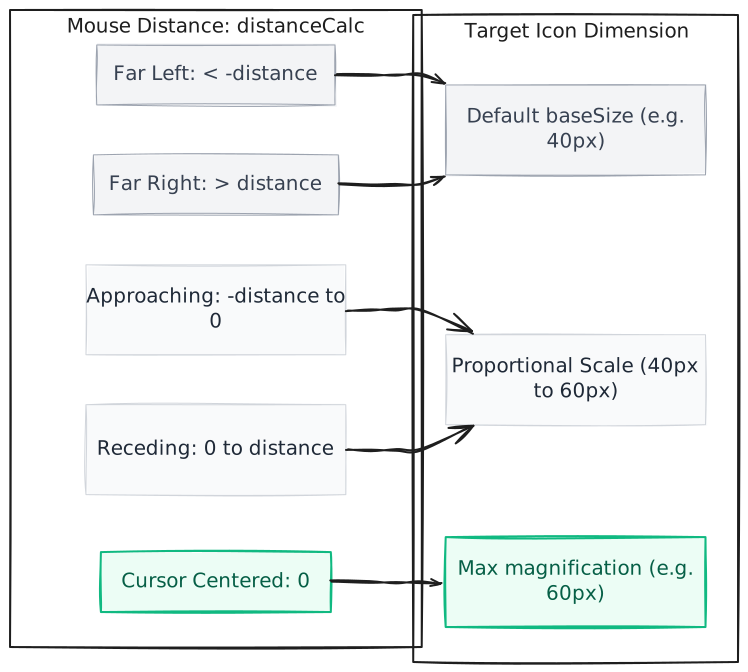
const sizeTransform = useTransform(
  distanceCalc,
  [-distance, 0, distance],
  [size, targetSize, size],
)- Range mapping boundaries:
- When the absolute distance delta exceeds the threshold
distance(e.g. 140px), the icon size clamps to the baselinesize(e.g. 40px). - When the distance delta is exactly 0 (the mouse cursor rests directly on the center of the icon), the size returns
targetSize/ magnification (e.g. 60px). - Inside that bubble, values interpolate linearly.
- When the absolute distance delta exceeds the threshold
D. Elastic Smooth Filter (scaleSize)
Linear interpolation values update rigidly with each pixel movement, resulting in jagged, blocky updates. To smooth the transition:
const scaleSize = useSpring(sizeTransform, {
  mass: 0.1,
  stiffness: 150,
  damping: 12,
})
Adding useSpring channels raw coordinates changes into physical movement:
mass: 0.1: Keeps the tracking weight feather-light, ensuring immediate responses.stiffness: 150: Pulls the physical spring tension fast, achieving rapid inflation speed.damping: 12: Dampens oscillations smoothly to prevent dizzying bounces on fast mouse snaps.
Customizable Properties Reference
| Property | Default | Type | Description |
|---|---|---|---|
iconSize | 40 | number | Default height and width of base dock icons in pixels. |
iconMagnification | 60 | number | Magnification limit coordinates when cursor is centered over an icon. |
iconDistance | 140 | number | Proximity range threshold in pixels where icons begin inflating. |
disableMagnification | false | boolean | Allows disabling the hover-magnification bubble behavior. |
direction | "middle" | "top" | "middle" | "bottom" | Layout vertical alignment reference within the bounds track. |