Home

Scroll Based Velocity

An explanation of the ScrollVelocity component: creating a high-performance scroll-driven marquee using Framer Motion and GPU-accelerated canvas translations.

Technical breakdown of the Scroll Based Velocity component: an interactive marquee that dynamically accelerates, decelerates, and reverses direction in response to page scrolling velocity. Using Framer Motion hooks, React Context synchronization, and viewport observers, the component delivers smooth, hardware-accelerated loops while respecting reduced motion preferences.

[!NOTE] This component is inspired by the Magic UI Scroll Based Velocity.

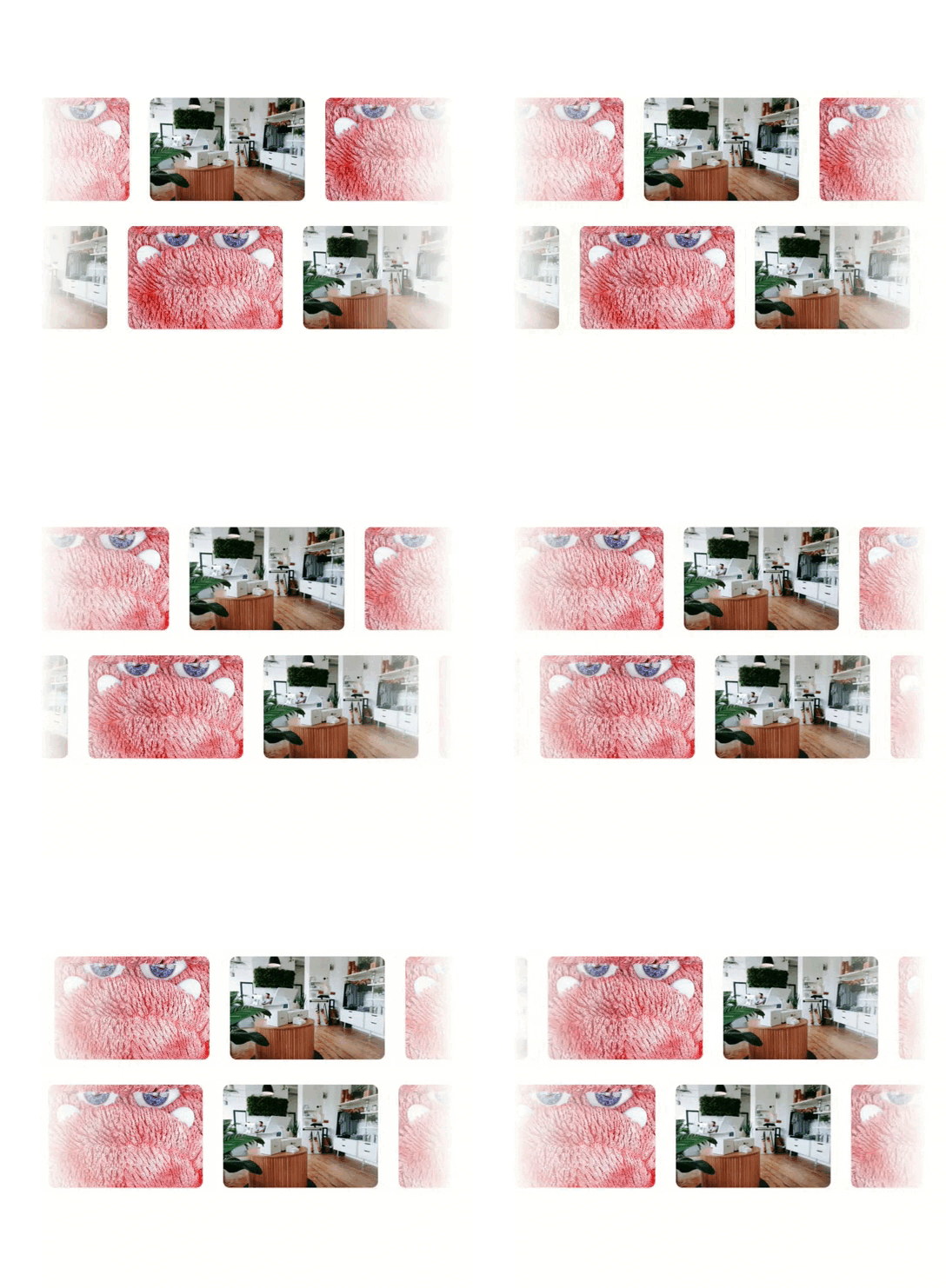
Scroll Based Velocity Demo

1. High-Level Flow Chart

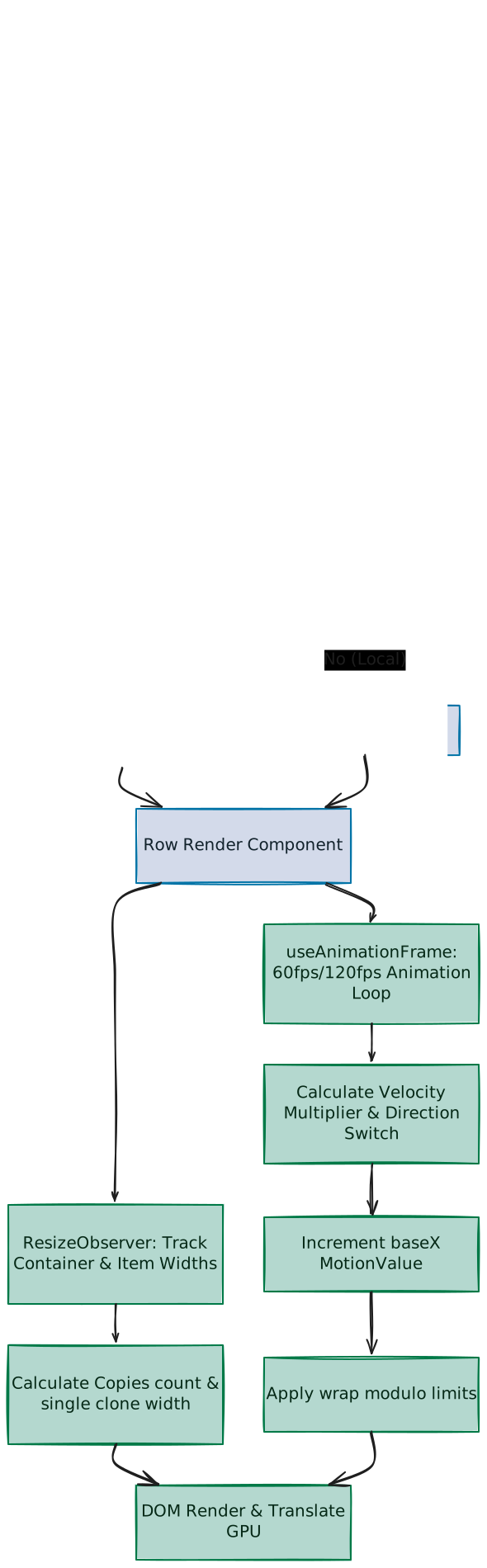
The flowchart below visualizes the data pipeline of the scroll-based marquee, representing the journey from browser scroll input to the final GPU-accelerated layout transformation:

Scroll Based Velocity Flowchart

2. Component Implementation (scroll-based-velocity.tsx)

Below is the complete implementation of the ScrollVelocity component:

"use client"

import React, { useContext, useEffect, useRef, useState } from "react"
import {
  motion,
  useAnimationFrame,
  useMotionValue,
  useScroll,
  useSpring,
  useTransform,
  useVelocity,
} from "motion/react"
import type { MotionValue } from "motion/react"

import { cn } from "@/lib/utils"

interface ScrollVelocityRowProps extends React.HTMLAttributes<HTMLDivElement> {
  children: React.ReactNode
  baseVelocity?: number
  direction?: 1 | -1
  scrollReactivity?: boolean
}

export const wrap = (min: number, max: number, v: number) => {
  const rangeSize = max - min
  return ((((v - min) % rangeSize) + rangeSize) % rangeSize) + min
}

const ScrollVelocityContext = React.createContext<MotionValue<number> | null>(
  null
)

export function ScrollVelocityContainer({
  children,
  className,
  ...props
}: React.HTMLAttributes<HTMLDivElement>) {
  const { scrollY } = useScroll()
  const scrollVelocity = useVelocity(scrollY)
  const smoothVelocity = useSpring(scrollVelocity, {
    damping: 50,
    stiffness: 400,
  })
  const velocityFactor = useTransform(smoothVelocity, (v) => {
    const sign = v < 0 ? -1 : 1
    const magnitude = Math.min(5, (Math.abs(v) / 1000) * 5)
    return sign * magnitude
  })

  return (
    <ScrollVelocityContext.Provider value={velocityFactor}>
      <div className={cn("relative w-full", className)} {...props}>
        {children}
      </div>
    </ScrollVelocityContext.Provider>
  )
}

export function ScrollVelocityRow(props: ScrollVelocityRowProps) {
  const sharedVelocityFactor = useContext(ScrollVelocityContext)
  if (sharedVelocityFactor) {
    return (
      <ScrollVelocityRowImpl {...props} velocityFactor={sharedVelocityFactor} />
    )
  }
  return <ScrollVelocityRowLocal {...props} />
}

interface ScrollVelocityRowImplProps extends ScrollVelocityRowProps {
  velocityFactor: MotionValue<number>
}

function ScrollVelocityRowImpl({
  children,
  baseVelocity = 5,
  direction = 1,
  className,
  velocityFactor,
  scrollReactivity = true,
  ...props
}: ScrollVelocityRowImplProps) {
  const containerRef = useRef<HTMLDivElement>(null)
  const blockRef = useRef<HTMLDivElement>(null)
  const [numCopies, setNumCopies] = useState(1)

  const baseX = useMotionValue(0)
  const baseDirectionRef = useRef<number>(direction >= 0 ? 1 : -1)
  const currentDirectionRef = useRef<number>(direction >= 0 ? 1 : -1)
  const unitWidth = useMotionValue(0)

  const isInViewRef = useRef(true)
  const isPageVisibleRef = useRef(true)
  const prefersReducedMotionRef = useRef(false)

  useEffect(() => {
    const container = containerRef.current
    const block = blockRef.current
    let ro: ResizeObserver | null = null
    let io: IntersectionObserver | null = null
    let mq: MediaQueryList | null = null
    const handleVisibility = () => {
      isPageVisibleRef.current = document.visibilityState === "visible"
    }
    const handlePRM = () => {
      if (mq) {
        prefersReducedMotionRef.current = mq.matches
      }
    }

    if (container && block) {
      const updateSizes = () => {
        const cw = container.offsetWidth || 0
        const bw = block.scrollWidth || 0
        unitWidth.set(bw)
        const nextCopies = bw > 0 ? Math.max(3, Math.ceil(cw / bw) + 2) : 1
        setNumCopies((prev) => (prev === nextCopies ? prev : nextCopies))
      }

      updateSizes()

      ro = new ResizeObserver(updateSizes)
      ro.observe(container)
      ro.observe(block)

      io = new IntersectionObserver(([entry]) => {
        isInViewRef.current = entry.isIntersecting
      })
      io.observe(container)

      document.addEventListener("visibilitychange", handleVisibility, {
        passive: true,
      })
      handleVisibility()

      mq = window.matchMedia("(prefers-reduced-motion: reduce)")
      mq.addEventListener("change", handlePRM)
      handlePRM()
    }

    return () => {
      if (ro) {
        ro.disconnect()
      }
      if (io) {
        io.disconnect()
      }
      document.removeEventListener("visibilitychange", handleVisibility)
      if (mq) {
        mq.removeEventListener("change", handlePRM)
      }
    }
  }, [children, unitWidth])

  const x = useTransform([baseX, unitWidth], ([v, bw]) => {
    const width = Number(bw) || 1
    const offset = Number(v) || 0
    return `${-wrap(0, width, offset)}px`
  })

  useAnimationFrame((_, delta) => {
    if (!isInViewRef.current || !isPageVisibleRef.current) return
    const dt = delta / 1000
    const vf = scrollReactivity ? velocityFactor.get() : 0
    const absVf = Math.min(5, Math.abs(vf))
    const speedMultiplier = prefersReducedMotionRef.current ? 1 : 1 + absVf

    if (absVf > 0.1) {
      const scrollDirection = vf >= 0 ? 1 : -1
      currentDirectionRef.current = baseDirectionRef.current * scrollDirection
    }

    const bw = unitWidth.get() || 0
    if (bw <= 0) return
    const pixelsPerSecond = (bw * baseVelocity) / 100
    const moveBy =
      currentDirectionRef.current * pixelsPerSecond * speedMultiplier * dt
    baseX.set(baseX.get() + moveBy)
  })

  return (
    <div
      ref={containerRef}
      className={cn("w-full overflow-hidden whitespace-nowrap", className)}
      {...props}
    >
      <motion.div
        className="inline-flex transform-gpu items-center will-change-transform select-none"
        style={{ x }}
      >
        {Array.from({ length: numCopies }).map((_, i) => (
          <div
            key={i}
            ref={i === 0 ? blockRef : null}
            aria-hidden={i !== 0}
            className="inline-flex shrink-0 items-center"
          >
            {children}
          </div>
        ))}
      </motion.div>
    </div>
  )
}

function ScrollVelocityRowLocal(props: ScrollVelocityRowProps) {
  const { scrollY } = useScroll()
  const localVelocity = useVelocity(scrollY)
  const localSmoothVelocity = useSpring(localVelocity, {
    damping: 50,
    stiffness: 400,
  })
  const localVelocityFactor = useTransform(localSmoothVelocity, (v) => {
    const sign = v < 0 ? -1 : 1
    const magnitude = Math.min(5, (Math.abs(v) / 1000) * 5)
    return sign * magnitude
  })
  return (
    <ScrollVelocityRowImpl {...props} velocityFactor={localVelocityFactor} />
  )
}

3. Scroll Dynamics & Spring Physics

To create a marquee that responds organically to user interaction, the component monitors scroll event variables and refines them using a mass-spring physics engine.

A. Raw Scroll Extraction & Velocity

The scrolling pipeline initiates with Framer Motion hooks:

  1. useScroll(): Creates a listener tracking the page's vertical position (scrollY in pixels).
  2. useVelocity(scrollY): Evaluates scroll position modifications over time to calculate raw scroll speed: v_raw = dy / dt (pixels/second)
const { scrollY } = useScroll();
const scrollVelocity = useVelocity(scrollY);

B. Spring Filtering

When you scroll a web page (especially with a mouse wheel), the movement happens in sudden ticks. If we mapped this raw scroll speed directly to the marquee, it would speed up abruptly and stop instantly, resulting in a laggy and choppy animation.

To fix this, the component passes the raw speed values through a virtual physics spring:

const smoothVelocity = useSpring(scrollVelocity, {
  damping: 50,
  stiffness: 400,
});
  • stiffness: 400: Controls how quickly the spring reacts. A higher value makes the marquee accelerate faster the moment you start scrolling.
  • damping: 50: Acts like physical friction. Instead of the marquee stopping abruptly when you release scroll inputs, it lets the speed slide and decay gradually back to its base rate, like a heavy spinning wheel slowing to a stop.

C. Normalization & Directional Mapping

The smoothed velocity represents physical pixels/second and can exceed ±5000 px/s. The component normalizes this range:

const velocityFactor = useTransform(smoothVelocity, (v) => {
  const sign = v < 0 ? -1 : 1;
  const magnitude = Math.min(5, (Math.abs(v) / 1000) * 5);
  return sign * magnitude; // Yields a value between -5 and 5
});
  1. Direction Polarizer (sign): Reads the scroll vector. Scrolling down yields a positive value (1), while scrolling up yields a negative value (-1).
  2. Magnitude Scaler: Compresses values by dividing by 1000 and multiplying by 5.
  3. Safety Clamping: Clamps the output magnitude to 5 to prevent rapid scrolls from accelerating the text into an unreadable blur.

4. Architecture Synchronization: Context vs. Local

Calculating page scroll parameters and updating spring values consumes CPU cycles.

                  ┌───────────────────────────────┐
                  │   ScrollVelocityContainer     │ (Calculates scroll velocity once)
                  └───────────────┬───────────────┘

                  ┌───────────────┴───────────────┐ (Provides ScrollVelocityContext)
                  ▼                               ▼
     ┌────────────┴───────────┐      ┌────────────┴───────────┐
     │   ScrollVelocityRow 1  │      │   ScrollVelocityRow 2  │ (Consumes shared MotionValue)
     └────────────────────────┘      └────────────────────────┘

If a developer places multiple row elements on a single page (e.g., three marquee bands with different sentences or directions), running local listeners on each band creates redundant event bindings:

Active Observers = 3 * (useScroll + useVelocity + useSpring)

To optimize this, the component implements a synchronized context architecture to share state:

  1. Declare Context & Container Provider: The container instantiates the scroll hooks once, computes the global velocityFactor MotionValue, and broadcasts it using React Context:
    const ScrollVelocityContext = React.createContext<MotionValue<number> | null>(null);
    
    export function ScrollVelocityContainer({ children }) {
      // ... calculated velocityFactor ...
      return (
        <ScrollVelocityContext.Provider value={velocityFactor}>
          {children}
        </ScrollVelocityContext.Provider>
      );
    }
  2. Consuming Context with Local Fallback: The individual rows look up the context. If found, they run synchronously from the shared velocity value. If missing, they fall back to instantiating local scroll observers:
    export function ScrollVelocityRow(props: ScrollVelocityRowProps) {
      const sharedVelocityFactor = useContext(ScrollVelocityContext);
      if (sharedVelocityFactor) {
        return <ScrollVelocityRowImpl {...props} velocityFactor={sharedVelocityFactor} />;
      }
      return <ScrollVelocityRowLocal {...props} />;
    }

5. Viewport Math: The Multi-Copy Formula

A scrolling marquee must span the screen continuously without gaps. If the child text block is narrower than the display window, blank space appears.

Viewport container width (cw = 1000px)
|======================================================|
| [ HELLO WORLD (bw = 300px) ]  (Empty layout space)   |
|======================================================|

The component resolves this dynamically by copying and tiling elements based on real-time measurements:

A. The Copy Calculation Formula

const nextCopies = bw > 0 ? Math.max(3, Math.ceil(cw / bw) + 2) : 1;

Given container width cw and text block width bw:

  • Math.ceil(cw / bw): Computes the minimum number of copies required to fill the screen space.
    • Example: If cw = 1000px and bw = 300px, then 1000 / 300 = 3.33.
    • Using Math.floor (rounding down to 3) yields target dimensions of only 900px, leaving a 100px empty space.
    • Using Math.ceil (rounding up to 4) spans the text across 1200px, fully covering the viewport with room to slide.
  • + 2 Buffer Tiles: Provides padding. As the horizontal row moves, the far-left coordinate tile slides out of view. The two buffer tiles ensure a replacement tile is ready to emerge on the right, preventing layout gaps.
  • Math.max(3, ...): Sets a minimum count of 3 copies to support short strings on wide screens.

B. Responsive Observers & Cleanup

Layout dimensions change during window resizing, device rotations, or dynamic font loads. To capture these modifications without leaking memory, the component uses ResizeObserver and IntersectionObserver paired with a React cleanup function:

useEffect(() => {
  const container = containerRef.current;
  const block = blockRef.current;
  if (!container || !block) return;

  const updateSizes = () => {
    const cw = container.offsetWidth || 0;
    const bw = block.scrollWidth || 0;
    unitWidth.set(bw);
    const nextCopies = bw > 0 ? Math.max(3, Math.ceil(cw / bw) + 2) : 1;
    setNumCopies((prev) => (prev === nextCopies ? prev : nextCopies));
  };

  const ro = new ResizeObserver(updateSizes);
  ro.observe(container);
  ro.observe(block);

  const io = new IntersectionObserver(([entry]) => {
    isInViewRef.current = entry.isIntersecting;
  });
  io.observe(container);

  return () => {
    ro.disconnect();
    io.disconnect();
  };
}, [children, unitWidth]);

6. The Conveyor Belt Illusion & Modulo Snapping

The marquee creates the illusion of infinite scrolling by looping a closed track of identical items. The reset must occur instantly at coordinates where the copy matches the starting tile's position.

A. Alignment Mechanics

  • Let width be the physical length of one text block clone (bw).
  • Let offset represent the running translation position (baseX).
const x = useTransform([baseX, unitWidth], ([v, bw]) => {
  const width = Number(bw) || 1;
  const offset = Number(v) || 0;
  return `${-wrap(0, width, offset)}px`;
});

The helper function performs modulo calculations:

export const wrap = (min: number, max: number, v: number) => {
  const rangeSize = max - min;
  return ((((v - min) % rangeSize) + rangeSize) % rangeSize) + min;
};

This keeps the output translation bound within the range [0, width].

B. Step-by-Step Position Reset

If block width bw = 300px, the row moves leftward (negative translation):

  • At offset 0px: wrap(0, 300, 0) returns 0px. Viewport displays Clone 1 (Full), Clone 2 (Full), and Clone 3 (Full).
  • At offset -150px (shifted left): wrap(0, 300, -150) returns -150px. Clones slide left by 150px.
  • At offset -299px (almost shifted one full panel): wrap(0, 300, -299) returns -299px.
  • When hitting -300px (The Reset Point): wrap(0, 300, -300) returns 0px. The translation snaps back to 0px instantly between animation frames (0ms).

Because Clone 2 is identical to Clone 1, and Clone 3 to Clone 2, the rendered layout at 0px matches the layout at -300px pixel-for-pixel:

Viewport ZoneLayout at 0pxLayout at -300pxMatch?
0px to 300pxClone 1 (Full)Clone 2 (Full)Yes
300px to 600pxClone 2 (Full)Clone 3 (Full)Yes
600px to 900pxClone 3 (Full)Clone 4 (Full)Yes

The transition is invisible to the user. The snaps happen at exact multiples of the width (N * bw):

  • Leftwards reset nodes: -300px, -600px, -900px, ...
  • Rightwards reset nodes: 300px, 600px, 900px, ...

7. Frame-Rate Independent Animation Loop

Animation speed must remain consistent across different display configurations (e.g., standard 60Hz screens vs. high-refresh 120Hz/144Hz panels).

useAnimationFrame((_, delta) => {
  if (!isInViewRef.current || !isPageVisibleRef.current) return;
  const dt = delta / 1000;
  const vf = scrollReactivity ? velocityFactor.get() : 0;
  const absVf = Math.min(5, Math.abs(vf));
  const speedMultiplier = prefersReducedMotionRef.current ? 1 : 1 + absVf;

  if (absVf > 0.1) {
    const scrollDirection = vf >= 0 ? 1 : -1;
    currentDirectionRef.current = baseDirectionRef.current * scrollDirection;
  }

  const bw = unitWidth.get() || 0;
  if (bw <= 0) return;
  const pixelsPerSecond = (bw * baseVelocity) / 100;
  const moveBy = currentDirectionRef.current * pixelsPerSecond * speedMultiplier * dt;
  baseX.set(baseX.get() + moveBy);
});

A. Frame Delta Adjustment

The useAnimationFrame callback provides delta (time elapsed since the last frame in milliseconds). The component normalizes this into seconds: dt = delta / 1000

To see how this creates consistency, let's look at an example where the marquee's calculated speed is 20px/s (how this speed is calculated is detailed in the next section):

  • 60Hz monitor (renders 60 frames per second): dt ≈ 0.0166s (moves 20px/s * 0.0166s ≈ 0.33px per frame)
  • 120Hz monitor (renders 120 frames per second): dt ≈ 0.0083s (moves 20px/s * 0.0083s ≈ 0.16px per frame)

Over a full second, the text travels the exact same distance (20 pixels) on both monitors. This ensures the content moves at the same speed regardless of display frame rates.

B. Frame Step Math

The movement calculation compiles multiple values: moveBy = direction * speed * speedMultiplier * dt

  1. Pixels per Second Calculation: speed = (bw * baseVelocity) / 100

    If a marquee has a block width (bw) of 400px and a baseVelocity of 5, the base speed is (400 * 5) / 100 = 20px/s. This scaling ensures content behaves consistently relative to its length (longer text moves more pixels per second, maintaining relative pace).

  2. Speed Multiplier: Is set to 1 (normal speed) at rest. Scaling increases to 1 + v_factor during active scrolling.

  3. Coordinate Update: Adds moveBy to baseX via .set(current + moveBy). This updates the MotionValue directly, bypassing React state re-renders to maintain rendering performance.


8. Rendering and System Resource Optimizations

The component implements optimizations to prevent layout degradation:

A. Viewport Occlusion Check

If a page is long, rendering off-screen animations wastes resources. An IntersectionObserver updates the isInViewRef flag:

io = new IntersectionObserver(([entry]) => {
  isInViewRef.current = entry.isIntersecting;
});
io.observe(container);

If the marquee is off-screen, the animation loop returns early, saving CPU/GPU cycles.

B. Document Visibility Detection

When a user switches tabs, calculations are suspended using the Page Visibility API. Event listeners track tab changes and toggle calculations:

const handleVisibility = () => {
  isPageVisibleRef.current = document.visibilityState === "visible";
};

document.addEventListener("visibilitychange", handleVisibility, { passive: true });
// cleanup on unmount
document.removeEventListener("visibilitychange", handleVisibility);

[!NOTE] Switching browser tabs does not unmount or destroy the React component; the page remains loaded and active in the background. Pausing the loop avoids wasting CPU and battery power when the tab is inactive.

C. GPU Compositing Layer Promotion

The moving elements are translated using CSS transform. To keep the scrolling butter-smooth, the component combines two styling properties to offload layout work to the GPU and keep it there:

  • transform-gpu: Forces the browser to translate the element using 3D rendering (via translate3d), moving calculations from the CPU to the GPU.
  • will-change-transform: Tells the browser to keep that GPU layer active in memory.

Why we need both:

  • Layer Thrashing Prevention: While transform-gpu pushes the animation to the GPU, browser rendering engines will dynamically destroy GPU layers when elements slow down or stop to save memory. Pairing it with will-change-transform locks the layer in graphics memory, eliminating the framerate stutters that occur when a browser continually recreates active GPU layers.
  • Guaranteeing Promotion: The will-change property is technically a hint—browsers can choose to ignore it if system memory is low. Pairing it with transform-gpu (3D transforms) forces immediate promotion in the graphics pipeline and acts as a fallback for older devices/browsers that don't support will-change.

9. Accessibility (A11y) & System Settings

The component accommodates user-level system preferences:

  • Reduced Motion Support: Some users enable "Reduce Motion" in their operating system settings to avoid motion sickness or sensory issues from rapid UI movements. The component queries this setting and listens to updates live:
    const mq = window.matchMedia("(prefers-reduced-motion: reduce)");
    const handlePRM = () => {
      prefersReducedMotionRef.current = mq.matches;
    };
    mq.addEventListener("change", handlePRM);
    // cleanup on unmount
    mq.removeEventListener("change", handlePRM);
    When this setting is active, the component locks the speedMultiplier at 1:
    const speedMultiplier = prefersReducedMotionRef.current ? 1 : 1 + absVf;
    By keeping the multiplier at 1, we ignore page scroll velocity spikes (absVf) and keep the marquee moving at its slow, gentle, constant base speed.
  • Screen Reader Clean Flow: Tiling text duplicates can cause screen readers to repeat announcements. The component sets aria-hidden={true} on all duplicates except the first:
    {Array.from({ length: numCopies }).map((_, i) => (
      <div
        key={i}
        ref={i === 0 ? blockRef : null}
        aria-hidden={i !== 0}
        className="inline-flex shrink-0 items-center"
      >
        {children}
      </div>
    ))}
    This ensures screen readers announce the sentence only once.

10. Customizable Properties Reference

PropertyDefaultTypeDescription
childrenReact.ReactNodeContent inside the marquee row.
classNameundefinedstringOptional Tailwind CSS classes.
baseVelocity5numberDefault scrolling speed.
direction11 | -1Base direction (1 = right, -1 = left).
scrollReactivitytruebooleanEnables scroll speed acceleration.

On this page