Interactive Lens
A technical breakdown of relative cursor tracking, coordinate-aligned transform origins, and CSS masking.
Implementation breakdown of the Lens component, covering its layered layout composition, relative cursor coordinates tracking, CSS radial gradient masking, and synchronized scaling transforms.
[!NOTE] This component is referenced from the Magic UI Lens.
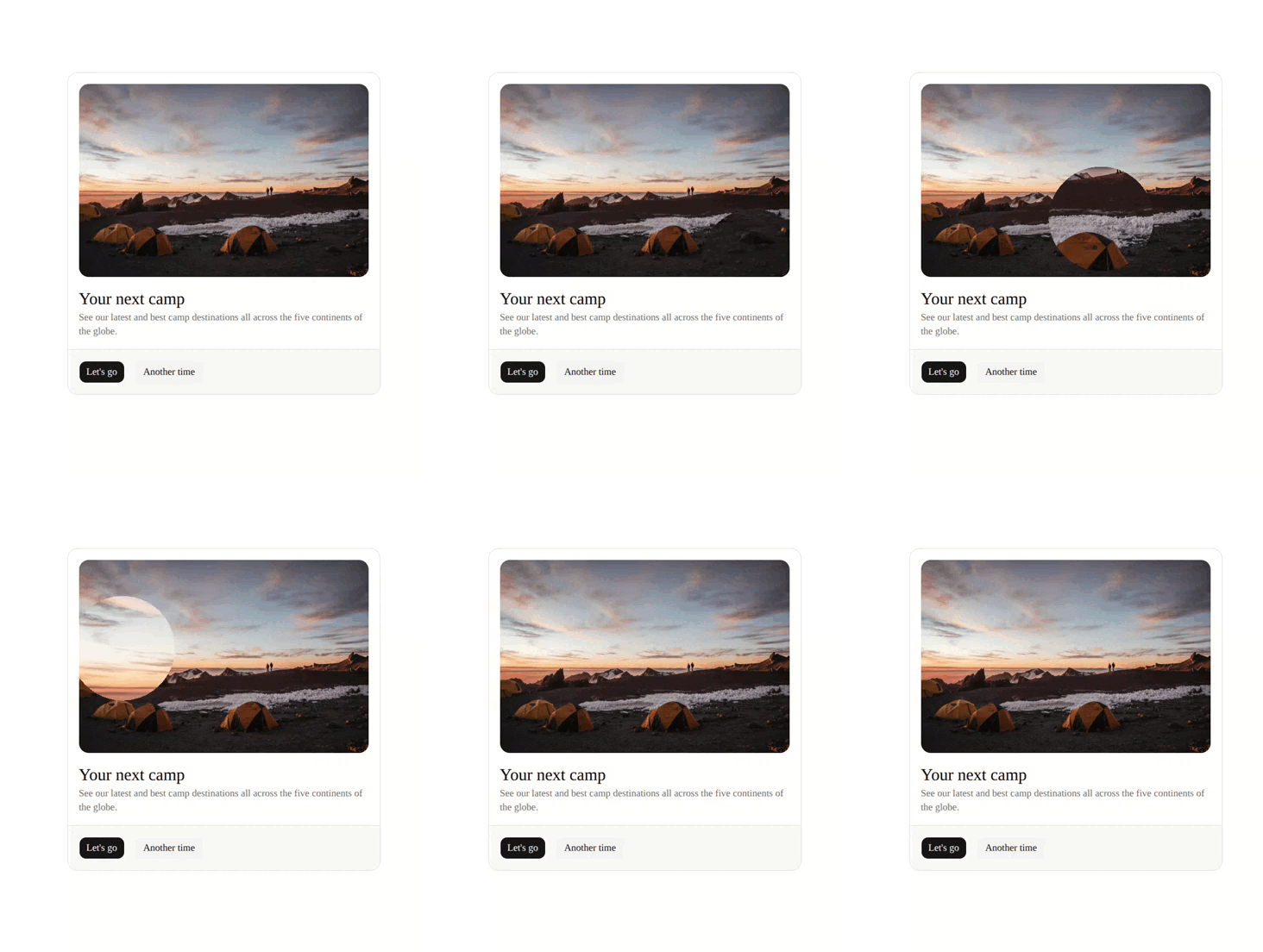
1. High-Level Flow Chart
The diagram below details the visual layers and calculation pipeline used to map mouse movement to hardware-accelerated scaling and masking transforms:
2. High-Level Overview
The magnifying glass is not actually reshaping or enlarging a single element dynamically. At the rendering level, it stacks four distinct DOM layers together to create the optical zoom illusion:
- Root Container Wrapper (
div): Binds event listeners for mouse progression, tracks focus (tabIndex), and sets boundary constraints (e.g.overflow-hidden,rounded-xl). - Base Layer (Children): The default, unmagnified element displayed normally at the bottom of the stack.
- Mask Container Layer (
motion.div): Positioned absolutely over the base layer, it applies the circular CSSradial-gradientmask (mask-imageand-webkit-mask-image) to crop the zoom window. - Magnified Layer (
div): Tucked inside the Mask Container, this layer renders a duplicate of the children scaled up byzoomFactorand anchored to the cursor location.
As the mouse moves, the zoom center (transformOrigin) and the mask center move in perfect sync. This aligns the magnified details with the unmagnified portion underneath, giving the illusion of a magnifying lens moving across the surface.
3. Component Implementation (lens.tsx)
Below is the complete implementation of the Lens component using React and Framer Motion:
"use client"

import React, { useCallback, useMemo, useState } from "react"
import { AnimatePresence, motion, useMotionTemplate } from "motion/react"

interface Position {
  /** The x coordinate of the lens */
  x: number
  /** The y coordinate of the lens */
  y: number
}

interface LensProps {
  /** The children of the lens */
  children: React.ReactNode
  /** The zoom factor of the lens */
  zoomFactor?: number
  /** The size of the lens */
  lensSize?: number
  /** The position of the lens */
  position?: Position
  /** The default position of the lens */
  defaultPosition?: Position
  /** Whether the lens is static */
  isStatic?: boolean
  /** The duration of the animation */
  duration?: number
  /** The color of the lens */
  lensColor?: string
  /** The aria label of the lens */
  ariaLabel?: string
}

export function Lens({
  children,
  zoomFactor = 1.3,
  lensSize = 170,
  isStatic = false,
  position = { x: 0, y: 0 },
  defaultPosition,
  duration = 0.1,
  lensColor = "black",
  ariaLabel = "Zoom Area",
}: LensProps) {
  if (zoomFactor < 1) {
    throw new Error("zoomFactor must be greater than 1")
  }
  if (lensSize < 0) {
    throw new Error("lensSize must be greater than 0")
  }

  const [isHovering, setIsHovering] = useState(false)
  const [mousePosition, setMousePosition] = useState<Position>(position)

  const currentPosition = useMemo(() => {
    if (isStatic) return position
    if (defaultPosition && !isHovering) return defaultPosition
    return mousePosition
  }, [isStatic, position, defaultPosition, isHovering, mousePosition])

  const handleMouseMove = useCallback((e: React.MouseEvent<HTMLDivElement>) => {
    const rect = e.currentTarget.getBoundingClientRect()
    setMousePosition({
      x: e.clientX - rect.left,
      y: e.clientY - rect.top,
      })
  }, [])

  const handleKeyDown = useCallback((e: React.KeyboardEvent) => {
    if (e.key === "Escape") setIsHovering(false)
  }, [])

  const maskImage = useMotionTemplate`radial-gradient(circle ${lensSize / 2
    }px at ${currentPosition.x}px ${currentPosition.y
    }px, ${lensColor} 100%, transparent 100%)`

  const LensContent = useMemo(() => {
    const { x, y } = currentPosition

    return (
      <motion.div
        initial={{ opacity: 0, scale: 0.58 }}
        animate={{ opacity: 1, scale: 1 }}
        exit={{ opacity: 0, scale: 0.8 }}
        transition={{ duration }}
        className="absolute inset-0 overflow-hidden"
        style={{
          maskImage,
          WebkitMaskImage: maskImage,
          transformOrigin: `${x}px ${y}px`,
          zIndex: 50,
        }}
      >
        <div
          className="absolute inset-0"
          style={{
            transform: `scale(${zoomFactor})`,
            transformOrigin: `${x}px ${y}px`,
          }}
        >
          {children}
        </div>
      </motion.div>
    )
  }, [currentPosition, maskImage, zoomFactor, children, duration])

  return (
    <div
      className="relative z-20 overflow-hidden rounded-xl"
      onMouseEnter={() => setIsHovering(true)}
      onMouseLeave={() => setIsHovering(false)}
      onMouseMove={handleMouseMove}
      onKeyDown={handleKeyDown}
      role="region"
      aria-label={ariaLabel}
      tabIndex={0}
    >
      {children}
      {isStatic || defaultPosition ? (
        LensContent
      ) : (
        <AnimatePresence>
          {isHovering && LensContent}
        </AnimatePresence>
      )}
    </div>
  )
}
4. Relative Mouse Coordinates
To scale and mask the element at the exact location of the user's cursor, the component translates global page viewport coordinates into container-relative coordinates:
const handleMouseMove = useCallback((e: React.MouseEvent<HTMLDivElement>) => {
  const rect = e.currentTarget.getBoundingClientRect()
  setMousePosition({
    x: e.clientX - rect.left,
    y: e.clientY - rect.top,
  })
}, [])getBoundingClientRect()computes the layout boundaries of the outer container wrapper relative to the viewport.- Subtracting
rect.leftandrect.topfrom the mouse pointer coordinates (e.clientX,e.clientY) yields coordinate values(x, y)that are relative to the top-left corner of the container.
5. CSS Masking & Performance Optimization
To clip the zoom container to a circle, a CSS mask is generated. This is where the core magnifying stencil is defined.
Deconstructing the Radial Gradient
When compiled, the string generated by the component matches the structural template below:
mask-image: radial-gradient(circle 85px at 200px 150px, black 100%, transparent 100%);- Circle Radius:
circle [lensSize / 2]pxcreates a circular boundary with a radius equal to half the configured lens size. - Anchor Center:
at [x]px [y]pxcenters the radial shape precisely over the relative cursor coordinates. - Hard Mask Edge:
black 100%, transparent 100%ensures that the transition between opaque mask and transparent canvas happens instantly. Instead of a fading gradient, it cuts a sharp, circular hole.
Any pixel inside the circle is rendered at full opacity (visible), and every pixel outside the circle is rendered at 0% opacity (transparent). Showing the Zoom Layer inside the mask hole while the Base Layer shows outside creates the magnifying glass illusion.
Direct DOM Updates & Performance Optimization (useMotionTemplate)
Updating template strings directly through React state on every mouse movement induces severe stuttering due to continuous virtual DOM re-evaluation:
const maskImage = useMotionTemplate`radial-gradient(...)`Using useMotionTemplate from Framer Motion allows coordinate updates to bypass React's standard component lifecycles. It modifies the styling properties directly on the DOM element, keeping calculations minimal and preserving fluid frame rates.
6. The Physics and Math of Transform Origin Alignment
For the magnifying lens to appear realistic, the magnified overlay details must line up pixel-for-pixel with the unmagnified layer underneath.
If you scale an element using the default center anchor (50% 50%), the content expands outward from the center. This shifts pixels away from the cursor, causing the magnified details to drift out of visual alignment with the parent layer underneath.
To prevent this distortion, both the mask container (motion.div) and the zoomed-in target child (div) anchor their transformations to the exact cursor coordinates:
- Cursor Position =
(x, y) - Mask Stencil Center =
(x, y) - Scale Transform Origin =
(x, y)
By aligning the origin of the scale with the center of the mask hole:
- The pixel directly under the mouse pointer
(x, y)remains static on the screen. - All surrounding details scale outward relative to that point.
- During the hover entry transition (
scale: 0.58toscale: 1), the magnifying glass expands organically outward from the tip of the cursor rather than sliding diagonally from the center of the component.
7. Cross-Browser Vendor Prefixes
The style attributes include dual parameters:
style={{
  maskImage,
  WebkitMaskImage: maskImage,
}}maskImage: Maps to standard CSSmask-image, supported natively by modern browsers (Firefox, Chrome, Edge, and Safari 15.4+).WebkitMaskImage: Maps to-webkit-mask-image, required by older WebKit engines (Safari versions 15.3 and below) and legacy embedded WebViews in mobile apps (like Instagram or Twitter/X in-app browsers).
Without WebkitMaskImage, standard CSS masking will fail on these older versions and embedded web components, rendering the zoomed-in container as a massive, un-clipped block covering the entire component.
8. Keyboard Accessibility (tabIndex)
By default, standard HTML div elements cannot be selected using a keyboard. To ensure keyboard users can interact with the magnifier:
- Focusability (
tabIndex={0}): Allows users to select the magnifying container by pressing theTabkey on their keyboard. - Escape Key Dismiss (
onKeyDown): Enables users to press theEscapekey to instantly close the magnifier when it is selected.
9. Customizable Properties Reference
| Property | Default | Type | Description |
|---|---|---|---|
zoomFactor | 1.3 | number | The magnification scale multiplier. Must be greater than 1. |
lensSize | 170 | number | Sizing footprint of the circular magnifying lens in pixels. |
isStatic | false | boolean | When enabled, prevents mouse tracking and locks the lens location. |
position | { x: 0, y: 0 } | Position | Absolute manual positioning coords for the lens. |
defaultPosition | undefined | Position | Resting coordinates of the lens when mouse hover is inactive. |
duration | 0.1 | number | Standard entry/exit scaling animation duration in seconds. |
lensColor | "black" | string | The gradient mask color. (Note: Under CSS alpha masking, the color value itself does not matter; only the opacity determines visibility). |
ariaLabel | "Zoom Area" | string | Accessibility label description. |