Classes and Objects
Core building blocks of Object-Oriented Programming (OOP), explaining Classes and Objects in Java.
Before diving into advanced design patterns and system architecture, it is essential to have a rock-solid understanding of the core building blocks of Object-Oriented Programming (OOP). At the heart of OOP are Classes and Objects.
This article explores what they are, how they relate to each other, and how they function in memory, using Java for examples.
What is a Class?
In programming, a Class is a blueprint or template from which objects are created. It represents a set of properties and methods that are common to all objects of one type.
When we define a class, we are essentially defining a new custom data type. Defining a class does not allocate memory for any actual data (like a username or age); it is just a conceptual template. The runtime only allocates memory for data when we instantiate an object using that template.
[!NOTE] When a class definition is loaded by the runtime, it consumes a small, fixed amount of memory in a dedicated metadata area (often called the Code Segment or Method Area) to store the class structure, methods, and static references. This metadata storage is constant regardless of how many instances are created. Actual object instance data is only allocated on the Heap when we instantiate an object.
A class typically consists of two main components:
- State (Fields/Attributes): Variables that hold the data of the object.
- Behavior (Methods): Functions that define what the object can do and how it interacts with its data.
UML Class Diagram
In object-oriented design, we often visualize classes using UML (Unified Modeling Language) Class Diagrams before writing code. A class diagram is divided into three sections: the class name at the top, its attributes (state) in the middle, and its methods (behavior) at the bottom.
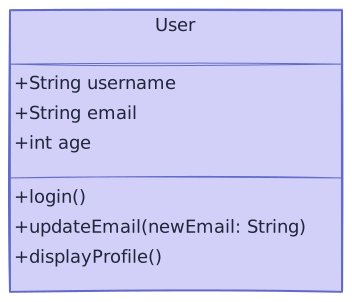
[!TIP] UML Visibility Modifiers: The symbols preceding the attributes and methods indicate their access levels:
+representspublic(accessible from any class).-representsprivate(accessible only within this class).#representsprotected(accessible within package and subclasses).~representspackage-private(the default access in Java).
Defining a Class in Java
Here is how we can define a simple class in Java:
public class User {
    // 1. State (Attributes)
    String username;
    String email;
    int age;

    // 2. Behavior (Methods)
    public void login() {
        System.out.println(username + " has logged in.");
    }

    public void updateEmail(String newEmail) {
        this.email = newEmail;
        System.out.println("Email updated to: " + email);
    }
}
In the example above, User is our class. It establishes that any User will have a username, email, and age, and can perform actions like login() and updateEmail().
What is an Object?
If a class is the blueprint, an Object is the actual, tangible entity built from that blueprint. It is an instance of a class.
When an object is created, the system allocates memory for it (typically in the heap space). Each object gets its own separate copy of the state (fields) defined in the class. This means we can create multiple objects from the same class, and they can each hold different data while sharing the same behavior definition.
Creating an Object in Java
To create an object in Java, we use the new keyword. The new keyword is responsible for allocating memory at runtime.
public class Main {
    public static void main(String[] args) {
        // Creating an object (instance) of the User class
        User user1 = new User();

        // Setting state for user1
        user1.username = "alice_dev";
        user1.email = "alice@example.com";
        user1.age = 28;

        // Invoking behavior
        user1.login(); // Output: alice_dev has logged in.

        // Creating a second object
        User user2 = new User();
        user2.username = "bob_builder";
        user2.email = "bob@example.com";
        user2.age = 32;

        user2.login(); // Output: bob_builder has logged in.
    }
}
Notice that user1 and user2 are completely distinct objects in memory. Modifying the state of user1 does not affect user2.
How Memory Works (Briefly)
When we write User user1 = new User(); and assign it values, the runtime allocates memory in two main regions: Stack Memory and Heap Memory.
- Stack Memory: Used for executing threads and storing local variables. Allocation is extremely fast and follows a LIFO (Last In, First Out) stack frame structure because the size of each stack frame is pre-determined at compile-time. Each active method call gets its own stack frame containing:
- Local Variables & Parameters: Primitive values (like a local
int tempAge = 28) and reference pointers (likeuser1pointing to the heap) defined inside a method. - The Implicit instance reference: For any non-static (instance) method, an implicit reference (called
thisin Java/C++ orselfin Python/Rust/Swift) is stored in the frame, pointing back to the current object executing the method.
- Local Variables & Parameters: Primitive values (like a local
- Heap Memory: A large, shared pool of memory where objects are dynamically allocated at runtime. This includes the actual object data and all of its instance variables (even primitives, since they belong to the object).
Stack vs. Heap Comparison
| Feature | Stack Memory | Heap Memory |
|---|---|---|
| What it stores | Local variables and object references (pointers). | The actual objects and their instance variables. |
| Access | Private to the executing thread (thread-safe). | Shared by all threads (requires thread-safety controls). |
| Lifetime | Temporary (exists only while the method is executing). | Persistent (lives until there are no references pointing to it). |
| Management | Automatically managed (pushed/popped with stack frames). | Managed by the Garbage Collector (GC). |
| Size | Small (can cause StackOverflowError if exceeded). | Large (can cause OutOfMemoryError if exceeded). |
| Allocation Speed | Extremely fast (simple stack pointer shift). | Slower (requires searching for free space). |

The reference points to the location of the object in the heap. If we were to write User user3 = user1;, we wouldn't be creating a third object; we would simply be creating another reference pointing to the exact same object as user1 in the heap.
What about Methods?
A common point of confusion is: Where is a class's method code stored when we instantiate objects?
- Code Segment / Metadata Space: The compiled instructions (bytecode or machine code) of your methods (like
login()) are loaded only once in a read-only code/metadata memory segment. They are not duplicated for each object. - Heap: Each object instance stores only its unique state (instance fields like
username,email). - Stack: When a method is called (e.g.,
user1.login()), a temporary stack frame is pushed onto the Stack to execute the shared instructions using the object's data from the Heap.
Object Lifecycle and Garbage Collection
What happens to the object in the heap when we no longer need it?
If we write user1 = null;, or if user1 goes out of scope (e.g., the method finishes executing and its stack frame is popped), the reference in the stack is destroyed. As a result, the object in the heap no longer has any active references pointing to it.
Unlike languages like C++, where developers must manually deallocate memory, Java manages this automatically:
- The Garbage Collector (GC) runs in the background.
- It periodically identifies objects on the heap that are no longer reachable by any references.
- It automatically reclaims their memory so it can be reused.
The null Reference
If we declare a reference variable but do not instantiate an object with new, the reference points to null (nothing):
User user4 = null; // No object created in the heap yetIf we attempt to call a method or access a field on a reference that points to null (e.g., user4.login()), the program will throw a NullPointerException (NPE). Checking for null or utilizing safe design patterns is a vital practice in software engineering.
The new Keyword and Constructors
Notice the parentheses in new User(). This is a call to a Constructor.
A constructor is a special block of code that is called automatically when an object is instantiated. Its primary purpose is to initialize the newly created object's state.
If we don't explicitly provide a constructor, Java provides a Default Constructor behind the scenes. However, it is usually better practice to define our own constructors so we can enforce that objects are created in a valid state from the start.
Parameterized Constructors
We can define a constructor that takes arguments to initialize the object's fields immediately upon creation.
public class User {
    String username;
    String email;
    int age;

    // Parameterized Constructor
    public User(String username, String email, int age) {
        // The 'this' keyword refers to the current object instance
        this.username = username;
        this.email = email;
        this.age = age;
    }

    public void displayProfile() {
        System.out.println("Profile: " + username + " | " + email);
    }
}
Now, object creation becomes much cleaner:
public class Main {
    public static void main(String[] args) {
        // Creating the User instance using the parameterized constructor
        User user1 = new User("alice_dev", "alice@example.com", 28);

        user1.displayProfile();
        // Output: Profile: alice_dev | alice@example.com
    }
}
[!NOTE] The
thiskeyword is crucial when our constructor parameters have the same names as our class fields. It tells the compiler to assign the value from the local parameter (username) to the object's instance variable (this.username), resolving the naming conflict.
Access Modifiers (Encapsulation)
In real-world software design, we rarely expose our class fields directly. Instead, we control access to them using Access Modifiers. This is the foundation of encapsulation (protecting state).
Most object-oriented languages support some variation of these visibility levels:
private: Accessible only within the defining class.protected: Accessible within the class, its package/namespace, or its subclasses.public: Accessible from any class.internal/default: Accessible only within the same module, package, or assembly (e.g., default visibility in Java is package-private; in C# it is internal; in C++ it is private).
For clean design, we generally keep our fields private and expose them via public getter and setter methods. This allows us to intercept reads and writes to enforce rules (like validation).
public class User {
    private String username;
    private int age;

    public User(String username, int age) {
        this.username = username;
        setAge(age); // Enforce age rules during construction
    }

    // Getter
    public int getAge() {
        return this.age;
    }

    // Setter with validation logic
    public void setAge(int age) {
        if (age < 0) {
            throw new IllegalArgumentException("Age cannot be negative.");
        }
        this.age = age;
    }
}
Static vs. Instance Members
When designing classes, we need to decide whether a field or method belongs to the individual object instance or the class itself.
- Instance Members: Belong to a specific object. Each object we create gets its own unique copy.
- Static Members: Belong to the class itself. Only one copy exists in memory, which is shared by all instances of that class.
public class User {
    private String username; // Instance variable (unique to each User)
    private static int userCount = 0; // Static variable (shared among all Users)

    public User(String username) {
        this.username = username;
        userCount++; // Increment the shared count whenever a new user is instantiated
    }

    // Static method (can be called without creating a User object, e.g., User.getUserCount())
    public static int getUserCount() {
        return userCount;
    }
}
The final Keyword (Immutability)
In software design, we use the final keyword (similar to readonly or const in other languages) to restrict modification. It can be applied in three places:
- Variables: The variable's reference or primitive value cannot be reassigned. Note that if a final variable points to an object, the object's internal state can still be mutated; only the reference itself is locked.
- Methods: The method cannot be overridden by subclasses, preventing child classes from altering core behavior.
- Classes: The class cannot be inherited (subclassed), securing the class structure from modification.
Summary
- Class: A blueprint or template defining state (fields) and behavior (methods). It is a logical construct.
- Object: An instance of a class. It is a physical reality in memory (typically Heap).
newkeyword: Allocates memory for a new object at runtime.- Constructor: A special method used to initialize an object's state during creation.
thiskeyword: Refers to the current object instance, useful for resolving naming conflicts.- Access Modifiers: Keywords (
private,public,protected, default) that control visibility to restrict direct access to fields (encapsulation). - Static vs. Instance: Instance members belong to unique object instances; static members belong to the class itself and are shared by all instances.
finalkeyword: Restricts modification, making variables immutable, methods non-overridable, and classes non-inheritable.
Understanding classes and objects is the first critical step in object-oriented programming. In the upcoming topics, we will build upon this foundation to explore how objects can interact with each other and how we can structure them better.