Introduction to Low-Level Design
An introduction to what low-level design is, why it matters, OOP pillars, and core design principles.
When starting to build software, the first instinct is often to just write code that "works." This means writing functions, hooking them up to databases, and deploying them. But as a project grows, this approach can quickly lead to what developers call spaghetti code—a tangled mess where making a small change in one file unexpectedly breaks other features.
This is why studying Low-Level Design (LLD), also commonly referred to as Object-Oriented Design (OOD), is important.
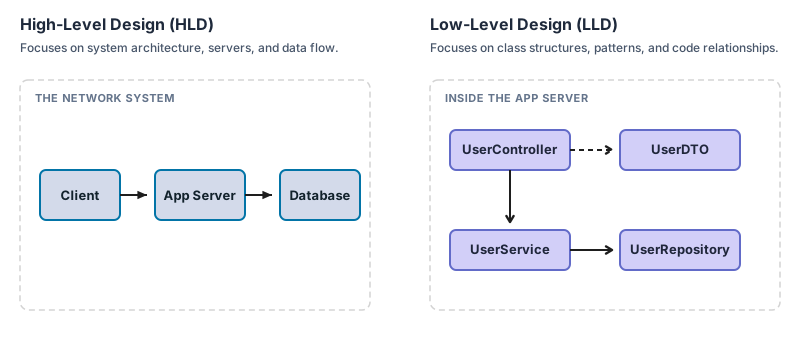
While High-Level Design (HLD) deals with the macro-architecture of a system (like databases, load balancers, and network layers), Low-Level Design focuses on the micro-architecture—the files, classes, interfaces, and methods that make up the actual codebase.
HLD vs. LLD: What is the Difference?
Understanding LLD is easier when contrasting it directly with High-Level Design. It is often compared to building a house:
- High-Level Design is the blueprint showing the layout of the rooms, the plumbing network, and where the electrical mains enter the house.
- Low-Level Design is the detailed specification of the cabinets, the materials used for the pipes, and how the doors hinge and swing open.
Here is a quick breakdown of how they compare in software:
| Feature | High-Level Design (HLD) | Low-Level Design (LLD) |
|---|---|---|
| Primary Focus | System Architecture & Infrastructure | Code Structure & Object Relationships |
| Scope of Design | The entire system (servers, databases, network boundaries) | A single service, module, or package boundary |
| Core Components | Load Balancers, Databases, CDNs, Queues, etc. | Classes, Interfaces, Methods, Design Patterns, etc. |
| Key Questions | • How to scale and distribute system traffic? • Where is data stored and partitioned? | • How to organize code into classes and interfaces? • How to make classes extensible and easy to test? |
| Main Risks Addressed | System crashes, data loss, high latency, single points of failure | Rigid code (hard to modify), high technical debt, regression bugs |
| Common Diagrams | System Architecture, Network Topology | Class Diagrams, Sequence Diagrams |
1. The Four Pillars of Object-Oriented Design (OOD)
Most modern low-level design is built on Object-Oriented programming paradigms. Structuring code begins with these four classic pillars:
A. Encapsulation (Protecting State)
Encapsulation is the practice of bundling data (state) and the methods that operate on that data into a single unit (a class), while restricting direct access to some of the object's components.
- Analogy: A vending machine. A user cannot reach inside and grab a soda directly. Instead, interaction happens through a public interface (pressing buttons and inserting coins). The machine validates the request internally and dispenses the drink safely.
- Why it matters: It prevents external code from putting an object into an invalid state. For example, a
BankAccountclass should not allow external code to directly modify abalancevariable; it must go throughdeposit()orwithdraw()methods that enforce validation rules.
B. Abstraction (Hiding Complexity)
Abstraction means exposing only the essential features of an object while hiding the underlying implementation details.
- Analogy: Driving a car. To speed up, the driver presses the gas pedal. There is no need to understand combustion chambers, fuel injection, or gear ratios to drive. The pedal serves as the abstraction layer.
- Why it matters: It reduces cognitive load. Developers can use a library or a class by simply reading its public methods without needing to audit hundreds of lines of internal helper code.
C. Inheritance (Code Reusability)
Inheritance allows a new class (subclass) to adopt the properties and behaviors of an existing class (superclass), representing an "Is-A" relationship.
- Analogy: A generic
Userclass contains basic fields likeidandemail. APremiumUserclass inherits fromUserbut adds custom attributes likesubscriptionExpiry. - Why it matters: It reduces duplicate code. However, inheritance is often used cautiously, as deep hierarchies can make code rigid and hard to modify.
D. Polymorphism (Flexibility)
Polymorphism (meaning "many forms") is the ability of a single entity — such as a method, operator, or object — to take on multiple forms or behaviors depending on the context in which it is used. In Object-Oriented Design, this is commonly seen as Subtype Polymorphism, where different classes share a common interface or parent class but each respond to the same method call in their own unique way.
- Analogy: A universal "Play" button on a media player. The player doesn't care whether the source is an audio MP3 file, a video MP4 file, or a live stream. It just calls
.play()on the media object, and each media type handles the playback differently. - Why it matters: This allows writing code that interacts with interfaces rather than concrete classes, making the program highly extensible.
2. Core Metrics: Coupling and Cohesion
In low-level design, these two design metrics are critical. They determine whether a codebase remains maintainable or becomes difficult to manage.
Loose Coupling (Independence)
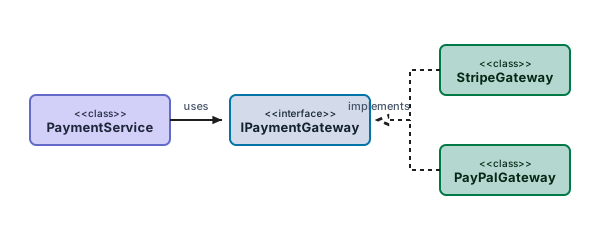
Coupling refers to how dependent different classes or modules are on one another. The goal is always to aim for loose coupling.
- If Class A is tightly coupled to Class B, any change to Class B will force modifications in Class A as well.
- Example: If backend code directly instantiates a
PostgreSQLConnectioninside a controller, it is tightly coupled to PostgreSQL. Switching to MongoDB would require rewriting the controller. Depending instead on a genericDatabaseConnectioninterface keeps the codebase loosely coupled, allowing database implementations to be swapped easily.
High Cohesion (Focus)
Cohesion refers to how focused and closely related the responsibilities inside a single class or module are. The goal is always to aim for high cohesion.
- A class with low cohesion tries to do too many unrelated things.
- Example: A
BillingSystemclass that calculates invoices, formats HTML receipts, connects to the database, and sends notification emails has low cohesion. It is a "god object." A highly cohesive design splits these duties into specialized classes:InvoiceCalculator,ReceiptFormatter,BillingRepository, andEmailService.
3. The Low-Level Designer's Toolkit
Translating these design principles into clean, real-world code typically relies on three main tools:
A. SOLID Principles
SOLID is an acronym for five design principles that help make software designs more understandable, flexible, and maintainable:
- Single Responsibility Principle (SRP): A class should have one, and only one, reason to change.
- Open/Closed Principle (OCP): Software entities should be open for extension, but closed for modification.
- Liskov Substitution Principle (LSP): Objects of a parent class should be replaceable with objects of its subclasses without altering the correctness of the program (meaning subclasses must honor the contract of their parent class).
- Interface Segregation Principle (ISP): It is better to have many small, specific interfaces than one large, general-purpose interface.
- Dependency Inversion Principle (DIP): Depend on abstractions (interfaces) rather than concrete implementations.
[!NOTE] The plan is to deep dive into each of the SOLID principles with clean code examples in the next post of this series.
B. Design Patterns
Design patterns are reusable templates that solve common, recurring problems in software design. Instead of reinventing the wheel, the approach is to use these established blueprints. They are generally categorized into three groups:
- Creational Patterns: Focus on object creation mechanisms (e.g., Singleton, Factory, Builder).
- Structural Patterns: Focus on how classes and objects compose to form larger structures (e.g., Adapter, Decorator, Facade).
- Behavioral Patterns: Focus on communication and responsibility assignment between objects (e.g., Observer, Strategy, State).
C. UML Diagrams (Unified Modeling Language)
Before writing code, drawing diagrams helps map out the structural plan:
- Class Diagrams: Show the static structure of the system, including classes, attributes, methods, and relationships (like inheritance or composition).
- Sequence Diagrams: Show the dynamic flow of control—how objects interact step-by-step over time to complete a specific task.
4. Practical Rules of Thumb
While design principles are powerful, they are best applied pragmatically. Applying these three classic software engineering principles helps avoid over-engineering:
- KISS (Keep It Simple, Stupid): This means avoiding complex, nested code when a simple class or function will do. Simple code is easier to debug and maintain.
- DRY (Don't Repeat Yourself): This means avoiding copy-pasting code blocks. If the same logic appears in multiple places, extracting it into a reusable helper class or method is ideal.
- YAGNI (You Aren't Gonna Need It): This means avoiding designing features or writing code for hypothetical future requirements. Building only what is needed today, while designing it flexibly enough to be extended tomorrow.